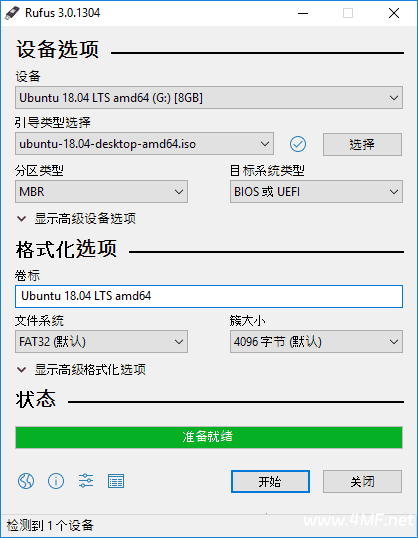
Rufus 中文版是免费开源的 U 盘引导盘制作工具,多语便携版免安装仅 1.4MB,支持将 ISO/IMG/ZIP 等镜像写入 U 盘制作可引导启动盘,适配系统安装、恢复等场景,兼容多系统、多启动模式,操作简单且校验精准。
小巧实用开源免费的U盘系统启动盘制作工具和格式化U盘的小工具,它可以快速将ISO镜像文件制作成可引导的USB启动安装盘,支持Windows或Linux启动,堪称写入镜像速度最快的U盘系统制作工具。
核心功能
- 多格式镜像写入:支持 ISO/IMG/ZIP 等映像文件,可制作 Windows、Linux、FreeDOS 等多系统引导盘
- 多文件系统兼容:支持 FAT16/FAT32/NTFS/UDF 等格式,按需选择适配不同启动需求
- 双启动模式支持:完美兼容 UEFI/BIOS 两种启动方式,适配各类计算机硬件配置
- 镜像完整性校验:内置 MD5/SHA-1/SHA-256 等校验功能,确保制作的启动盘文件无损坏
- 轻量便携使用:无需安装,可直接拷贝至 U 盘,随时随地制作引导盘,适配移动操作
软件特点
- 兼容性拉满:适配 Windows 全系列系统,支持 x86/x64 不同硬件架构,适配各类 U 盘
- 免费开源无限制:全程免费使用,开源可查,无隐藏收费、无功能限制
- 极简操作易上手:界面简洁明了,步骤清晰,新手也能快速完成启动盘制作
- 体积超小低耗:仅 1.4MB,占用系统资源极少,运行流畅不卡顿
- 多语言适配:支持中文、英语、法语等多语言界面,默认简体中文更贴合国内用户
新版变化
Rufus – Version History
https://github.com/pbatard/rufus/releases
版本 4.15
Add RISC-V 64 support to UEFI:NTFS
Improve the guards for using the “silent” Windows installation option
Improve the ability to cancel during write retries
Improve progress reporting for compressed image extraction
Fix unrestricted XML entity expansion and integer overflow in ezxml parser (courtesy of @esadowski4) [GHSA-55r2-34wg-8mv9]
Fix “silent” Windows installation failing at 75% in most cases [#2960]
Fix a crash during boot when using UEFI:NTFS on Snapdragon X based ARM64 platforms [#2934]
Fix first WUE option always being checked by default [#2965]
Fix an infinite loop when using Windows ISOs that contain multiple WIMs
Fix “Enable runtime UEFI media validation” checkbox not always being properly enabled
Other WUE improvements/fixes for OneDrive removal and username validation (with thanks to @christian8641) [#2984, #2991]
支持的操作系统ISO镜像:
Arch Linux, Archbang, BartPE/pebuilder, CentOS, Damn Small Linux, Debian, Fedora, FreeDOS,
FreeNAS, Gentoo, GParted, gNewSense, Hiren’s Boot CD, LiveXP, Knoppix, KolibriOS,Kubuntu, Linux Mint, NT Password Registry Editor, Parted Magic, Partition Wizard, Raspbian, ReactOS, Red Hat, rEFInd, Slackware, Super Grub2 Disk, Tails, Trinity Rescue Kit, Ubuntu, Ultimate Boot CD, Windows XP (SP2+), Windows Vista, Windows Server 2008, Windows 7, Windows 8/8.1, Windows 10/11, Windows Server 2012, Windows Server 2016, Windows Server 2022
对ISO支持的说明:
Rufus v1.10 及之后的所有版本都支持从ISO镜像 (.iso) 创建可引导USB启动盘。
对DOS支持的说明:
如果创建了一个DOS启动盘,但是没有使用美式键盘,Rufus 会尝试根据设备选择一个键盘布局,
在那种情况下推荐使用 FreeDOS(默认选项)而不是 MS-DOS,因为前者支持更多的键盘布局。
rufus-4.14p.exe 便携版 Windows x64
rufus-4.14.exe 标准 Windows x64
rufus-4.14_x86.exe 标准 Windows x86
资源下载
U盘引导盘制作工具 Rufus中文版 v4.15 / 4.16 Beta 多语便携版














《U盘引导盘制作工具 Rufus中文版 v4.15 / 4.16 Beta 多语便携版》等您坐沙发呢!